

A comprehensive solution to protect against malware, ransomware attacks and other threats to your business and your data.
Contact us to secure your infrastructure. Implement protective solutions with certified Direct IT specialists or obtain a panel and protect the company on your own.
Why choose Malwarebytes Endpoint Protection by Direct IT?
Efficiency:
Malwarebytes detects and removes not only the known threats, but it can also prevent unknown attacks thanks to unique machine learning technology (Anomaly Detection).
Direct IT specialists’ experience:
Direct IT ensures the optimal implementation of Malwarebytes in your company, tailored to the required security levels. Our specialists can configure the advanced security policy adapted to the IT infrastructure, monitor activities and react to potential threats.
Protection against ransomware:
Malwarebytes Endpoint Protection proactively fights ransomware by combining multiple security technologies and operating at every stage of the attack chain.
Funkcjonalności
Comprehensive WWW protection:
Malwarebytes proactively protects users from using malicious and dubious websites, malicious ads and scam networks, as well as from downloading potentially unwanted programs and mods.
Increased device security:
Malwarebytes blocks the remote code execution by a program called “exploit” and interrupts communication with suspicious “malware” servers to significantly reduce the scale of the attack and thus protect devices in the most effective way.
Ransomware Rollback:
Malwarebytes może cofnąć wszystkie szkody wykonane przez złośliwe oprogramowanie, przywracając urządzenia i pliki do stanu sprzed ataku. Funkcja Ransomware Rollback przechowuje wszystkie istotne zmiany na danym urządzeniu do 72 godzin wstecz co umożliwia odtworzenie plików, które zostały zaszyfrowane, usunięte lub zmodyfikowane.
Remote work protection:
Malwarebytes Endpoint Detection and Response has been enhanced with Malwarebytes Brute Force Protection feature. The feature blocks malicious login attempts and prevents RDP (Remote Desktop Protocol) intrusions on Windows computers and servers, so it is perfect for remote work environments where the user may be an easier target.

Extracting the attack::
The Malwarebytes Detection and Response solution blocks attacks and isolates malware from the IT environment, reducing the end-user's inconvenience. As it is equipped with three isolation modes (process, network or desktop), it is possible to maintain the efficiency of the IT infrastructure during an attack.
Prevention technologies:
Malwarebytes detects software vulnerabilities that could make our infrastructure vulnerable to attack and proactively prevents their exploitation by blocking the remote code execution.
Unlimited scalability:
Malwarebytes is a fully scalable solution. Regardless of the size of the IT infrastructure and its expansion, the solution can effectively protect both small and medium-sized companies and large corporations.
Multiple Platform Support:
Malwarebytes offers connectivity and customisation options to ensure all your organisational needs are met. It protects Windows and Linux servers and can be installed both on computers with Windows and MacOS systems as a dedicated application.
Protect your IT infrastructure with Malwarebytes
One of the greatest dangers for the Internet users is gaining access to a computer or server and the data stored on it via malicious software known as malware. The most bothersome and dangerous version of such attacks is a ransomware, which is a program that allows a ransom to be extorted by blocking access to the system or making it impossible to read data. Attacks on servers are the most dangerous as ransomware can spread to workstations and other servers.
Securing your IT infrastructure with a special focus on the servers is essential to protect your company's reputation and safeguard against data, productivity and credit losses.
Proactive server protection
Malwarebytes utilises the latest security solutions to prevent potential threats and attacks on your servers in a proactive way. Direct IT can provide a professional implementation of the system performed by trained and certified specialists, ensuring optimal protection for your company.
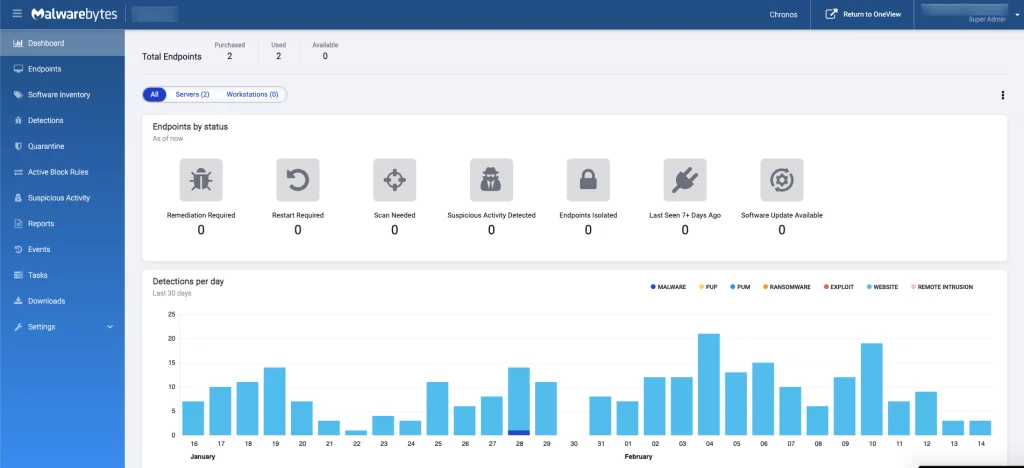
Compatibility
Physical environments
• Windows Server
• Linux
End devices
• Windows PC
• Mac